
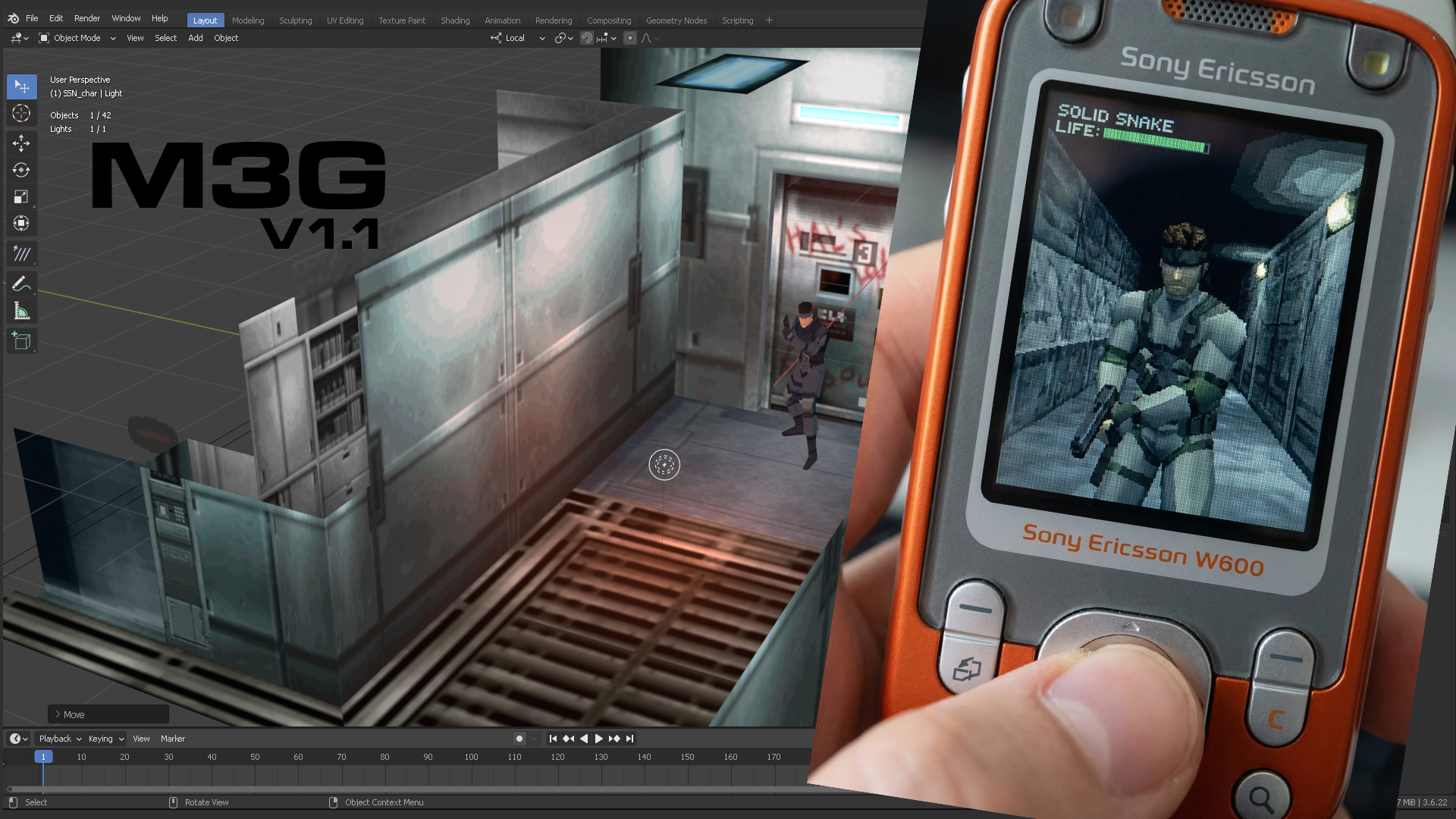
The m3g format is back after 22 years
3D graphics on mobile phones have evolved significantly, but the revolution began in Y2K. Telephone carriers in Tokyo developed custom phones that offered their users connectivity and 3D games. In this article, we’ll bring 2004 .jar midlet into a 2026 Android phone, so YOU can develop 3D java games in their original format.
This native Blender 3.6 .m3g exporter was built by Pierre Schiller using AI, based on his 20+ years of experience in 3D Animation, VFX, and video game design, to implement the full JSR184 API .with animation, material, lights, fog, environment, and custom properties.
It’s mind-blowing to think that when PS1 games were popular in America (i.e.: Megaman Legends, Metal Gear Solid), mobile phones in Japan were porting such titles to limited hardware and still performing flawlessly. Adventure, RPG, shoot-em-up, beat-em-up, puzzles, and other game genres were locked into their phones, licensed by the telecarriers. And this is the thriving environment where the Micro 3D Graphics in Java changed the mobile graphics world forever. A Java API technical proposal between Oracle, the JP phone carriers, Nokia, and Sony Ericsson was drafted to make 3D graphics available to America and the rest of the world.
The JSR-184 (Mobile 3D Graphics API for J2ME) was finalized in 2003, with a v1.1 maintenance release in June 2005. It was designed for Nokia, Sony Ericsson, Motorola, and any phone supporting Java at the time— phones with 2MB of RAM, 176×220 pixel screens, and no GPU. The entire 3D pipeline ran in software. The spec was authored by Tomi Aarnio, Kari Pulli, and the JSR-184 Expert Group at Nokia Research Center. Symbian (Nokia’s OS) and Mascot Capsule (HiCorp-JP) implemented additional functions to the JSR184 format and became widely adopted by many Java game developers. There’s no screenshot or written evidence that these developers used a graphical 3D environment similar to our modern-day Unreal Engine or Unity. It is known that these games were coded using Eclipse, Netbeans, and other proprietary IDE Japanese software tools.
The ecosystem peaked around 2005-2007:
- Tools: Nokia/Sony Ericsson SDK WTK, Mascot Capsule, Superscape Swerve, Kev Glass’s M3GToolkit
- Exporters: Blender 2.4x, HiCorp official 3DS Max, Maya, and Softimage plugins
- Books: “Mobile 3D Graphics with OpenGL ES and M3G” by Kari Pulli, Tomi Aarnio, Ville Miettinen, Kimmo Roimela, Jani Vaarala (2007, Morgan Kaufmann) — “Mobile 3D Graphics: Learning 3D Graphics” – Paperback, by Claus Höfele — “J2ME programming” by Martin J. Wells (1st and 2nd edition).
- Community: Forum Nokia, Sony Ericsson Dev world, JavaME developer forums, J2ME Polish
M3G declared Open Source
Although we couldn’t get an exact list of Java games that probably used Blender, the fast-moving hardware and software ecosystem was built on top of the .m3g specifications. Thus, evolving formats included .mtra/.bctra and .ht3 (all more technical features involving graphics and animations from high end 3D DCC’s authoring tools to implement more features from HiCorp’s Mascot Capsule’s API). However, the thriving environment for .m3g (JSR184) started to fall behind with Blender’s 2.5 new API changes that couldn’t support the old Blender 2.49 exporter, and it stopped being maintained in 2006. A new JSR231 and 239 proposal offered more support for OpenGL shader functions. By 2010, Android and iOS had killed J2ME. The community dissolved. Nokia forums shut down. The original .m3g developers moved to WebGL, Nvidia, Vulkan, or left graphics entirely. The M3G Toolkit websites went offline. HiCorp stopped operations and no longer offered support for their viewers, plugins, or converter tools. By 2012, Sony-Ericsson broke its partnership. The JSR-184 spec was open-sourced by the Nokia Foundation shortly after that.
The format was declared dormant, not because it was bad, but because the hardware evolved past it. A modern phone has 1000x the RAM, a dedicated GPU, and runs Unity or Unreal. Game developers wanted direct access to graphic processing functions, which is the foundation of why modern formats like GLB and threeJS evolved from such efficient and optimized .m3g performance. The Khronos Group has been an active participant in the 3d graphics vanguard since the early days of the JSR184, all the way until the development of modern day GTLF standard. However, no one has touched this format in over a decade.
Rebuilding the bridge: Enter Blender 3.6 and AI
⚡DOWNLOAD THE M3G EXPORTER PLUGIN FROM GITHUB>>
I started the study of the JSR184 spec two years ago (2024) because I came across this post. At the time, I didn’t know exactly how or why anyone would want to generate 3D graphics for Java. Mobile Fish was a very important influence in the .Jar games industry alongside GameLoft, Konami, and other companies around the world (especially SW, FR, IT, DE). In 2024, AI engines were not as smart as they are now, let alone helpful in coding something from 20 years ago. So I started to study the M3G API and the technical specifications on my own, but honestly, this was the first time for me to encounter such legacy code that resonated with my vision to simplify video game creation using Blender. I’ve previously developed RIG2U5, which took 10 months to plan and implement, so Blender can send full facial and body Rigs to Unreal Engine’s IK rig, Retargeter, and Modular Control Rig, 100% compatible for a modern game development environment. I like to make tools that help artists get into video game development.
Hardware and Software setup
After studying the JSR184 API, the next step was to actually acquire the hardware. (This is something you don’t have to do, I did it because I stress test all my code and devices, and I have a long history of testing emulators, sandbox and Virtual machines, that did not match up to reality after coding or deploying). I got a 2004 Compaq laptop with Window XP SP3 x32, and a Sony Ericsson W600. Then I setup the Netbeans 6.8 Environment with JDK 1.6.45 + Sony Ericsson J2ME SDK WTK (wireless toolkit); process which I shared in this video. I then tried ChatGPT, Qwen, Google Gemini for coding my own exporter, but it was Claude that evolved, more coherently, to make this task possible. So I invested in the coding plan, and in January 2026, we finally had a working prototype.
The original Blender 2.44 exporter was built by Gerhard Völkl. In Blender 2.49b, the exporter update also mentions Claus Höfele’s participation, and there was a Blender conference presentation by Sean Wylie-Toal (Bight Interactive) mentioning the .m3g exporter had over a year’s testing and developing API phase (we assume it was during the 2004-2005 time frame). This was the background that proved there was real enterprise support and interest to make Blender an authoring DCC for J2ME 3D graphics back then. But it’s 2026, and there is a huge problem: There was no technical background or API listing for the things the original addon had to do to “upgrade”. Fortunately, there were enough code comments to read: all the broken functions, all the “desired plans”, and some “technical recommendations”. I kid you not when I tell you the situation was comparable to someone giving you a match and sticks and telling you to build a modern train.I kid you not. So I rebuilt the entire exporter from scratch with AI. Here are some of the screen captures to show this was not an easy task to solve.
What .M3G can do
For a complete features list, please refer to the M3G Plugin GitHub Wiki>>
➡Java games, light enough to be implemented anywhere a .java compatible phone/device exists with D-pad+Numpad keys
➡Load faster than a .gif meme over any connection
➡3D graphics, fog, material animation, character animation, blendshapes, sprites, write custom properties to triggerJava classes
➡The NEW Blender M3G exporter will include additional functions + Java classes beyond its original development.
➡New Helper tools for Blender intended to visually help the artist send their project to a working, ready-to-deploy environment.
➡Create retro graphics, Retro moddings with the ORIGINAL intended format without byte-order failure.
➡Animate characters, materials, and properties in a modern 3D environment with Blender and its supportive community.

From Blender to Java
The coding environment of 2004 never had a visual 3Dspace for Java games, but if it had, it would be something powerful like Blender!
The general idea with the modern Blender 3.6 .m3g exporter involves creating a minimum scene (world color, 1 Light, and 1 Camera with a correct 177×220 aspect ratio), 3d mesh objects between 500-800 tris, assigning custom properties to the object to override global settings or send custom Java values; finally File>Export>.m3g and check the verbose console. After that, you can tell .java to “read” your file and even “find” the objects you want to affect, or their animations, using a “tagging” system.
You tag objects in Blender by adding a hashtag and a unique number to the object’s name, like this: Suzzane#20. The number (for example, 20) must not be repeated in other objects. You then use that number in Java to identify and retrieve the object directly with calls such as Object3D.find().
You tag animation ACTION, or NLA track animations by identifying the rig name, followed by the “End” frame number, and a second hashtag defining the Animation controller ID.
Example: If you have an Armature called “HumanRig”=>Rename it “A#200”, and 3 animations corresponding:
0-55 frames for “walk” in an ACTION strip –>> “walk#A200E55#01“
0-25 frames for “run” in an NLA stashed strip (only visible in the Blender outliner)
—>>”run#A200E25#02“
0-100 frames for “idle” in an NLA track clip —>>””idle#A200E100#03“

Example 1: Object UserID Tagging
Blender scene setup:
- Mesh named
Suzanne#20 - Camera named
MainCam#100 - Point Light named
KeyLight#50 - Empty named
SpawnPoint#300 - Sprite3D plane named
HealthBar#75
What the exporter does: translateUserID("Suzanne#20") finds the FIRST #, reads digits → userID = 20. Every M3G object gets this baked into its Object3D binary header.
Java side:
// Load the .m3g file
Object3D[] objects = Loader.load("/res/scene.m3g");
World world = (World) objects[0];

// Find any object by its userID — returns the exact M3G node
Mesh suzanne = (Mesh) world.find(20);
Camera mainCam = (Camera) world.find(100);
Light keyLight = (Light) world.find(50);
Group spawnPoint = (Group) world.find(300);
Sprite3D healthBar = (Sprite3D) world.find(75);

// Now do game logic
suzanne.setRenderingEnable(false);           // hide Suzanne
keyLight.setIntensity(0.5f);                 // dim the light
float[] spawnPos = new float[3];
spawnPoint.getTranslation(spawnPos);          // read spawn coordinates
healthBar.setCrop(0, 0, 64, 16);             // update HUD sprite
That’s the whole pipeline. The `#20` in Blender becomes the integer key that `find()` searches the entire scene graph for. No string lookups, no iteration — just one integer.
Example 2: NLA Multi-Action Tagging
Blender scene setup:
Armature object renamed to `A#200` (userID 200 for the skeleton Group).
Three animations:
`walk#A200E55#01` | walk, armature 200, ends frame 55, controllerID 1, lives in NLA stashed (Outliner only)
`run#A200E25#02` | run, armature 200, ends frame 25, controllerID 2, lives in NLA track clip
`idle#A200E100#03` | idle, armature 200, ends frame 100, controllerID 3, lives in NLA track clip
What the exporter does:`_gatherBoneActions()` iterates NLA tracks first, collecting unique actions from non-muted strips. If none found, falls back to the active action. So it finds all three. For each action, `_exportBoneAction()` creates ONE shared `M3GAnimationController`. It calls `parseActionID(“walk#A200E55#01”)` which finds the LAST `#`, reads digits → `controllerID = 1`. That controller’s `userID` is set to `1`.
At the time of export, you can choose to show the complete developer verbose(Check box ON), which will show the summary of all exported objects, lights, meshes, materials, animation tracks, object IDs, and other useful technical information about your current exported scene. Turning it off creates a simplified summary only. Once you export your .m3g, create a new .MIDlet in your IDE (I use Netbeans 6.8) to invoke the animations at runtime like this:
Java side
World world = (World) Loader.load("/res/character.m3g")[0];

// Find the skeleton and all animation controllers
Group skeleton = (Group) world.find(200);         // the armature
AnimationController walkCtrl = (AnimationController) world.find(1);
AnimationController runCtrl  = (AnimationController) world.find(2);
AnimationController idleCtrl = (AnimationController) world.find(3);

// Start with idle playing, others silent
walkCtrl.setWeight(0.0f);
runCtrl.setWeight(0.0f);
idleCtrl.setWeight(1.0f);
idleCtrl.setPosition(0, 0);    // rewind to start

// Player presses right arrow → switch to walk
public void startWalk() {
    idleCtrl.setWeight(0.0f);
    runCtrl.setWeight(0.0f);
    walkCtrl.setWeight(1.0f);
    walkCtrl.setPosition(0, 0);
}

// Player double-taps → switch to run
public void startRun() {
    idleCtrl.setWeight(0.0f);
    walkCtrl.setWeight(0.0f);
    runCtrl.setWeight(1.0f);
    runCtrl.setPosition(0, 0);
}

// Game loop advances world time, M3G runtime
// interpolates whichever controller has weight > 0
world.animate(worldTime);
The key insight: all three actions share the same bone hierarchy. The weight toggle is instant — no blending between animations (JSR-184 doesn’t support crossfade). You set one to 1.0 and the others to 0.0, and setPosition(0, 0) rewinds the active one. The E55/E25/E100 in the names are just artist convenience for knowing the frame counts at a glance — the exporter reads actual action.frame_range for timing.
The tag nomenclature is a very well thought-out system that also includes the Object>Custom property to add extra commands, which were common for other .m3g exporters like Superscape from 3DsMax.
How do I load a .JAR in my Android?
You created your .blend scene file> exported to .m3g, created your Netbeans project, coded your .java lines, now you have a .JAR but don’t have a retro phone. No problem! Install J2ME loader https://github.com/nikita36078/J2ME-Loader or Install JL-Mod https://github.com/woesss/JL-Mod (this one is based on JME loader, but you can use .png as custom skins for the phone model).
Pick the JL-Mod_0.87.1-arm64-v8a.apk if you want to run it on your modern Android. SHORT Video TUTORIAL>>
Transfer your .jar file to your Android phone (i.e: “my files” or “Downloads” folder). Once you have either of the JME Loader versions installed, click on the “+” on the lower right side of the screen, navigate to the folder where you placed your own .jar generated file, and load it for the 176×220 pixel screen size, click “Start” at the top of the screen.
You’re building a creation pipeline into a format that hasn’t had one in over a decade. The difference between “you can play old .jar games on Android” and “you can make NEW .jar games from Blender in 2026 and deploy them to Android and web” is enormous.

Product Roadmap (2026 Forward Vision)
Artist-friendly features are planned. Mind, I’m not reinventing hot water, but I do want to contribute to the point that 3D artists can feel at ease working with the known limited requirements of the format, like limiting polygons, vertex influences, bone hierarchies, texture limits, etc.
- Plugin Maintenance / Bug report / Workflow best practices
- Dedicated toolbar/ helpers/ custom classes
- 2″ short video training showcasing features
- Documentation to lower pipeline friction between Blender->Java game deployment.
Why now? Because it matters!
With proper addon maintenance, the next step will come from the community: Java developers, Retro modders, Retro game devs, original (new) to benefit devices that can load small .jars (think of wrist watches, home appliances UI, etc..). I am aware new API classes exist, and more Java security updates restrict certain devices, but that doesn’t mean FORMAT PRESERVATION and legacy tools have to disappear. Preserving the original format, which shaped the modern mobile graphics world, is not only a valuable resource for study but also a way to develop a more critical technical eye to question how we can make better lightweight games.
The use of “custom properties” (referred to as user-defined parameters) is a key mechanism for extending the exported .m3g files. These parameters embed custom data into the .m3g scene graph, which can then be read and acted upon by custom Java classes in the runtime environment (e.g., on a mobile device or J2ME emulator). This allows for behaviors beyond the standard JSR-184 spec, like physics simulations, level-of-detail (LOD) switching, or event triggers, without altering the core M3G objects. Asking around Facebook forums, I found a Java game developer with impressive demos who pointed me to the benefits of this in 3DsMax.
To the retro 3D community, the lo-fi aesthetic crowd, the J2ME preservation people, the indie developers who are tired of 2GB game installs, we got this ship off land, it’s fully open source, ready to build new games. After the .M3G format evolved, Mtrac/Btra formats followed. But those “exporters” are also missing from the golden era of .JAR videogames for 3D DCCs, including Blender, nowadays. Hopefully, this article will inspire the next “let’s restore a retro exporter natively in Blender” project. 😀
I intentionally left out around 70 pages of personal and tech journey in this article to be short and digestible. But if you’d like me to post more content about it, let me know. If you want to geek out about J2ME games technical implementations, you can reach me out and talk about it. Because if we can load 3D graphics faster than loading a cat meme, that’s a win in my book.
Please don’t forget to share, like, and comment on any of the above topics, it helps the page. Thanks!
Pierre Schiller
